Compliance Editor
Your central workspace for managing security rules.
Browse, search, and customize hundreds of compliance rules from mSCP baselines all in one powerful interface.
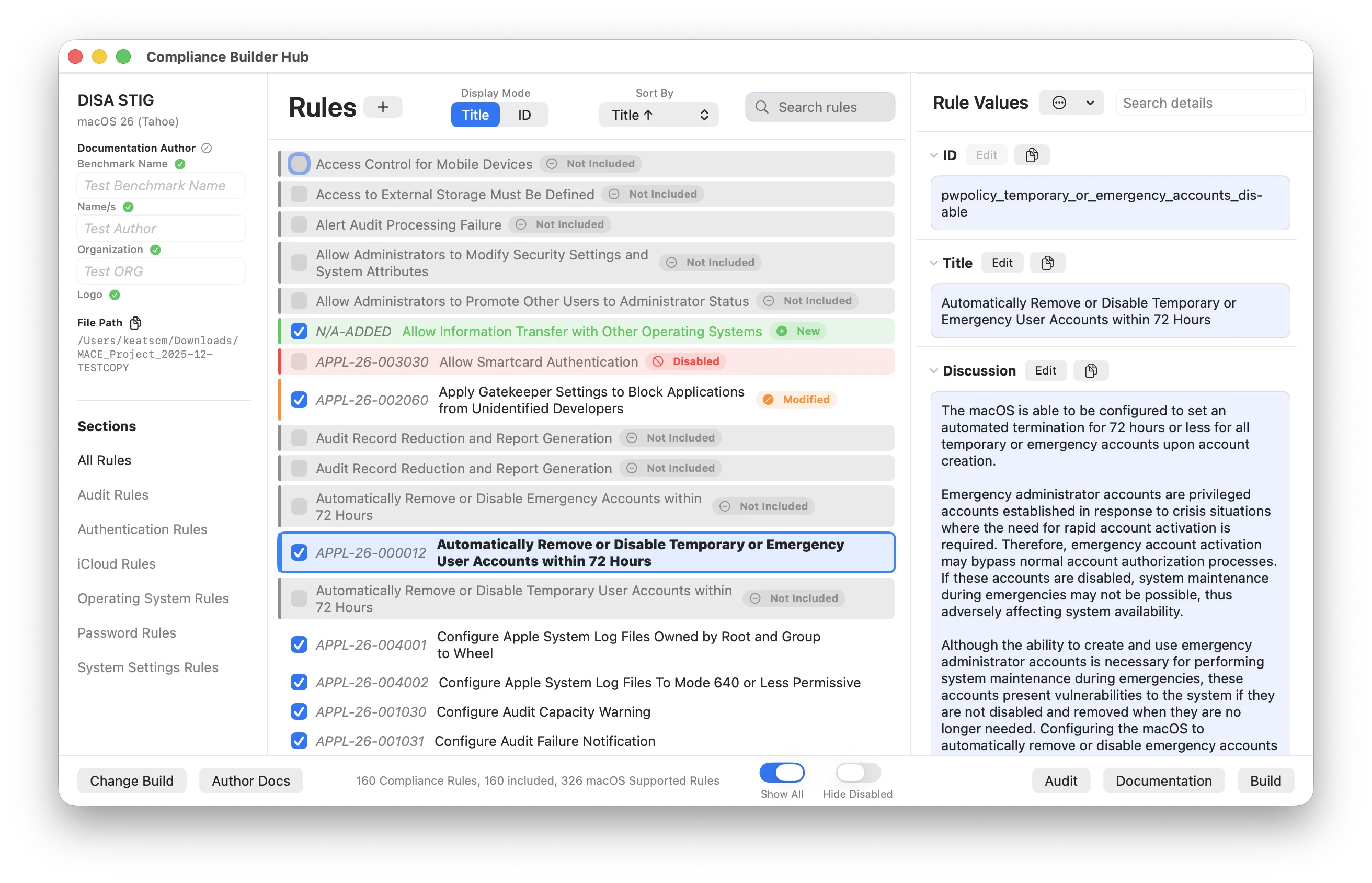
Interface Layout
📋 Rules List
The center panel shows all your rules with quick controls.
| ✓ | Include Checkbox — Checked is enabled, a dash is exempt (audited but not enforced), empty is disabled. See Exempting Rules |
| 🔤 | Title or ID View — Switch between showing rule titles or IDs |
| ↕️ | Sort By — Title, ID, Included, or Modified, plus STIG ID or CIS ID for those frameworks and Severity when the framework has it |
| 🔍 | Search — Matches rule title, ID, STIG or CIS ID, tags, and mobileconfig payload types |
| 🔽 | Filter — All, a specific payload type, Has Mobileconfig, Has DDM, Has Script, Has ODV, or the Exempt, Modified, Disabled, and Flagged rule states |
| ➕ | Add — Import a .yaml rule from disk into the project. To write one from scratch, use the Rule Builder on the main menu |
| 🏷️ | Framework IDs — Shows CIS or STIG IDs when applicable, and a High/Medium/Low severity badge for frameworks that define one |
| ⌨️ | Keyboard — Up and Down arrows move the selection, Space cycles the checkbox, Command-click and Shift-click multi-select |
Rule Status Indicators
📝 Detail Panel
The right panel, titled Rule Values, shows everything about the selected rule. Fields are ID, Title, Discussion, Check, Results (with a String, Integer, or Boolean type), Fix, Fix Additional Info, DDM Info, Mobileconfig, ODV, References, Tags, Severity, and Introduced. Each editable field has Edit, Save, Cancel, and a copy button, and a changed field gets an orange Modified badge. The panel also shows a Disabled Comment, Added Comment, Review Comment, or Exemption Reason field when the rule is in that state.
| 🔍 | Search details — Highlights matches in every field of the rule |
| 📋 | Copy — Each field has a copy button; the ODV, mobileconfig, and Raw YAML views have their own |
| 📂 | Show Rule in Finder — In the ⋯ menu. A modified rule offers both the modified and original files |
| 🌐 | View on GitHub — Opens the rule on mSCP's main branch. Hidden for custom rules |
| 📄 | View Raw YAML File — Edit the whole rule file directly, including fields the field view keeps read-only such as References and Tags |
| ⚑ | Flag for Review and Exempt Rule — Also in the ⋯ menu |
| ↩️ | Reset Rule… — Revert a modified rule to the original, after a confirmation |
| 🗑️ | Delete Rule… — Remove a custom rule you created, after a confirmation. Replaces Reset for custom rules |
Features
Exempting Rules
The include checkbox on every rule has three states, not two. Each click moves it one step along the cycle:
| 🖱️ | Click a checked rule to make it exempt. Click again to disable it. Click a third time to enable it again. |
| ⌥ | Option-click a checked rule to skip the exempt step and disable it directly. |
| ⌨️ | Spacebar with a rule selected follows the same cycle. |
| 📋 | Right-click a rule, or use the menu in the detail panel, for Exempt Rule and Remove Exemption. Exempting a disabled rule this way brings it back into the baseline as exempt. |
An exempt rule gets an indigo accent and an Exempt badge in the list. The detail panel gains an Exemption Reason field. The reason is optional in the app, but fill it in: it's written into the audit preferences, the build README, audit results, and documentation, so auditors can see why the rule isn't enforced. Exemptions and reasons are stored in the project's .mace file.
Exempt vs Flagged for Review
Exempt changes what gets built. Flag for Review is editor-only: it adds a yellow Review badge and an optional review comment so you can come back to a rule later, but it never changes build output. A rule can be both.
How an Exemption Flows Through
Mark a rule exempt once and every part of MACE honors it:
The audit preferences profile ships the rule as exempt = true with your reason, so the compliance script on each Mac knows to skip enforcement. The rule stays in the compliance script and is still checked. Its settings are left out of configuration profiles, DDM declarations, and the vendor manifest. The build README lists every exemption and its reason. The Build Hub footer shows the count, for example "117 rules (4 exempt)". This applies to Local Build and every MDM upload.
When the compliance script runs, an exempt rule that fails is logged as an allowed exemption with its reason, and fix mode skips it. The script reads exemptions from managed preferences first, then from the local org.<baseline>.audit domain. Admins can also add or remove exemptions on a single Mac with the script's --exempt and --unexempt flags.
The audit engine sheet has an Include Exemptions picker: None, Local Exemptions (what's deployed on this Mac), Compliance Exemptions (what's marked in this project), or both. Honored rules keep their Pass or Fail but get an Exempt badge, the pass rate leaves them out, and Need Attention ignores exempt failures. Exports can show the badge, the reason, and an Exempt column, or exclude exempt rules entirely.
An Exempt group under Rule Options controls Show Exempt Indicator, Include Reasons, and Own Section. Exempt rules get an indigo badge and reason block in HTML and PDF, a callout in Markdown and AsciiDoc, fields in JSON, and columns in CSV and XLSX.
Compare the project against its framework and exempt rules carry an Exempt badge, alongside Removed, Modified, and Custom. See Baseline Compare.
:::caution Things to know
- Disabling clears the exemption. A rule can't be both disabled and exempt. Disabling it by any route drops the exemption and its reason. Exemptions on rules that leave the baseline, for example after a framework change, are pruned the next time the project saves.
- Already-deployed profiles keep enforcing. Exempting a rule changes the next build. A profile that already landed on a Mac still enforces the setting until you re-upload or redeploy.
- mSCP engine builds patch the exemptions into the audit plist after the run, but mSCP's own profiles still include the exempt rules' settings. Build with the M.A.C.E. engine to leave them out.
- The script wants a reason. The app lets you exempt without one, but the on-device
--exemptflag requires a reason, and the build README shows "no reason recorded" for blank ones. :::
Bulk Actions and Multi-Select
Change many rules at once instead of clicking through them one by one.
| ⌘ | Command-click adds or removes a rule from the selection. Shift-click selects a range. Selected rows get a blue outline. |
| 📋 | Right-click any rule for submenus scoped to Selected Rules, All Rules, or All Shown Rules when a section, search, or filter is narrowing the list. |
| 📂 | Right-click a section in the left sidebar to act on All Rules in Section. |
| 🍎 | The same actions sit at the top of the Rules menu in the menu bar. |
Each submenu offers Enable, Exempt, Disable, Unexempt, Flag, and Unflag. Every item shows how many rules it will change, for example "Exempt All Shown Rules (12)", and is grayed out when there's nothing to do. Exempting in bulk also brings disabled rules back into the baseline as exempt.
Every bulk action asks for confirmation first. Disable, Exempt, and Flag let you type one justification, exemption reason, or review comment that's applied to every affected rule. You can still edit reasons per rule afterwards in the detail panel.
Automatic Rule Updates
MACE checks your project's rules against the latest mSCP rules from GitHub and notifies you when updates are available. Your custom modifications are always preserved.


| 🔄 | Auto-Check — Compares your rules against the cached copy of the project's own branch, while Auto-Download Rules is on |
| 📥 | Easy Updates — One click to apply all rule updates |
| 🛡️ | Preserves Custom Rules — Your modifications are never overwritten |
| 📋 | Change Summary — Counts rules updated, rules removed, rules affecting your baseline, and project files changed, with a What's Changing diff for each row |
Cmd+S.