Installation

One self-contained .app. Nothing else to install.
One native macOS application, with no installer to run and nothing else to set up.
| 📦 | Self-contained .app with everything bundled inside |
| ⚡ | Native macOS app built in Swift |
| 🔏 | Signed release builds with no Gatekeeper workarounds needed |
| ✅ | Free to use |
Requirements
| 💻 | macOS 14 (Sonoma) or later |
| 🖥️ | Apple Silicon or Intel Mac |
| 🔐 | Admin access only needed for audits, and for updates when the app folder isn't writable by your account |
Quick Start
Since MACE is just an app bundle, there's no single right way to install it. Drag it into place yourself, push it out with Installomator, or pull it down with Homebrew:
| 💿 | Manual (preferred): drag and drop the .dmg, works for everyone |
| 🚀 | Installomator: great for MDM and fleet deployments |
| 🍺 | Homebrew: for the brew crowd |
Homebrew and Installomator always install the latest stable release. Beta and pre-release builds aren't published to these channels. To try a beta, either download the pre-release .dmg directly from GitHub Releases, or install MACE and switch to the beta release channel so it updates itself to pre-release builds.
Installation Methods
Manual Install (Preferred)
The simplest option, and what we'd suggest for most people.
| 1️⃣ | Download the latest .dmg from GitHub Releases |
| 2️⃣ | Open the downloaded .dmg file |
| 3️⃣ | Drag MACE into your Applications folder |
| 4️⃣ | Launch MACE from your Applications folder |
| 5️⃣ | Clean up by ejecting the disk image and deleting the .dmg |
That's it! You're ready to start building your first compliance baseline.
Installomator (Fleet Deployments)
Deploying to more than one Mac? MACE has an Installomator label, so a single command does the job:
sudo ./Installomator.sh mace
Installomator must run as root. The label verifies MACE's Team ID (7U624389H9), pulls the latest signed .dmg directly from GitHub Releases and installs MACE into /Applications, so it's easy to wrap in a policy or package for Jamf Pro, Munki, Intune, or any MDM.
Homebrew (Command Line)
If you'd rather stay in the terminal, MACE has a Homebrew cask:
brew install --cask mace
Upgrade or remove it later with:
brew upgrade --cask mace
brew uninstall --cask mace
Automatic Updating
MACE keeps itself up to date. As long as the Mac can reach GitHub, it checks for a newer version on its own, no matter how you installed it.
| 🔄 | Automatic checks on every launch, while Check for Updates on Launch is on in Settings |
| 🌐 | Just needs a network connection to GitHub to see if a new version is available |
| 🔔 | Manual check anytime via Check for Updates |
| 📋 | Release notes show what's new in each update; the full changelog lives on GitHub Releases |
| ⬇️ | One click to download and install. MACE verifies the download's code signature, then quits and relaunches |

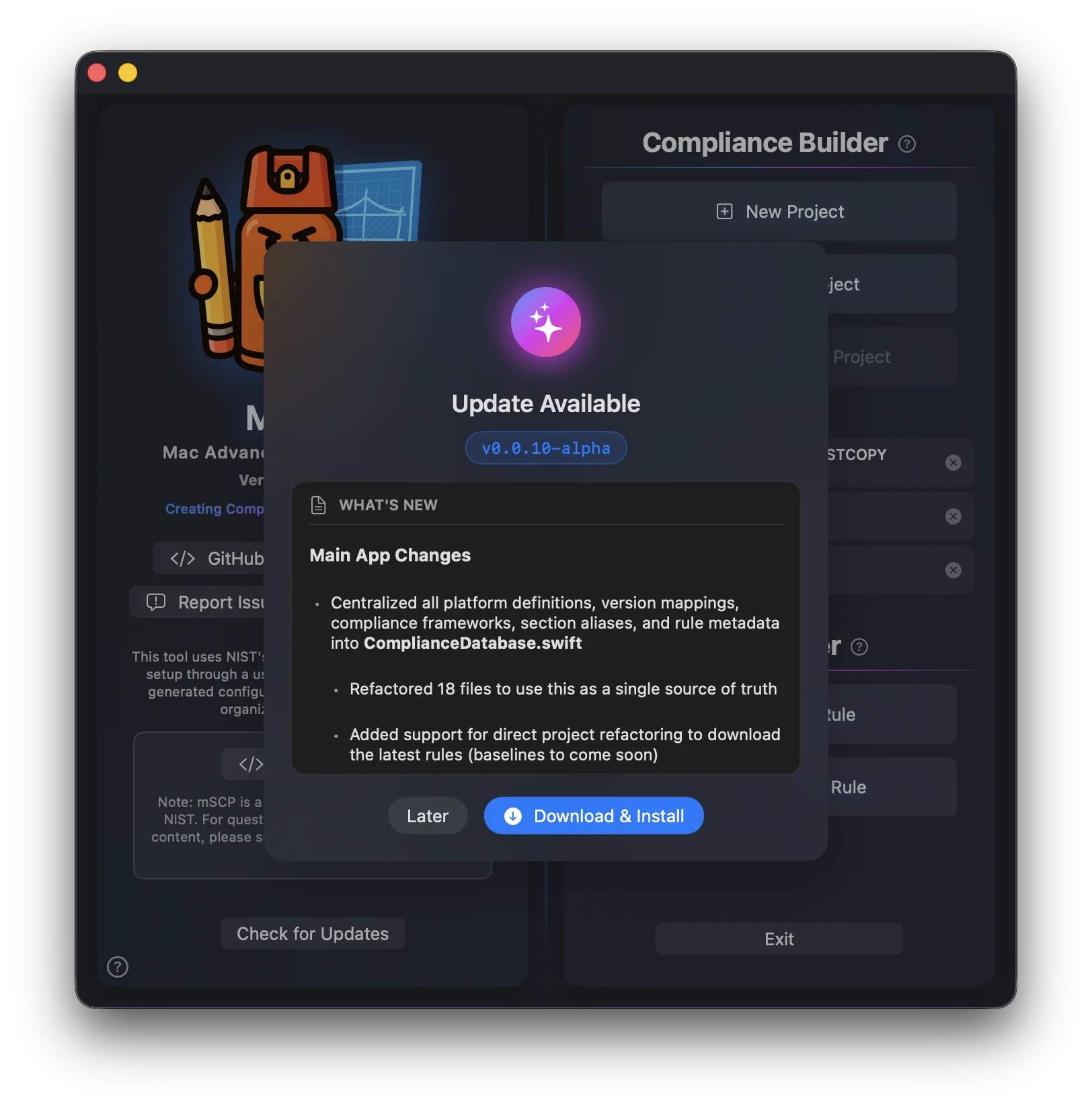
If the app or its folder isn't writable by your account, MACE asks for admin credentials with two choices: Install Helper & Update keeps a small update helper so you're never asked again, and Update This Time Only does a one-off install. You can remove the helper later under Settings → Advanced → Privileged Helpers. Older versions may not support automatic updates; download the latest version from GitHub Releases to enable this feature.
Release Channels
Out of the box, MACE only updates to stable releases. If you'd rather run pre-release builds, switch the channel:
| ⚙️ | Open MACE ▸ App Settings… → Updates |
| 🧪 | Set Release Channel to Beta |
From then on MACE picks up beta and pre-release versions automatically, exactly the way it handles stable ones. Switch back to Stable whenever you want to go back to release builds only.
Uninstalling
Built-in Uninstaller (Recommended)
MACE ships with an uninstaller script inside the app bundle. It lists everything it will remove, asks for confirmation, and only prompts for an admin password if the privileged helpers are installed:
/Applications/MACE.app/Contents/Resources/uninstaller.sh
| 👀 | --dry-run — list what would be removed without removing anything |
| ✅ | --yes — skip the confirmation prompt |
| ♻️ | --keep-app — reset MACE by removing all data but leaving the app in place |
Your compliance project folders are never touched — they live wherever you saved them and are treated as user documents.
Manual Removal
If you prefer to remove MACE by hand (or already dragged the app to Trash), here is everything the app creates:
1. Quit MACE, then drag MACE.app from Applications to Trash. If you installed via Homebrew, run brew uninstall --cask mace instead — but note that Homebrew only removes the app bundle, so the steps below still apply.
2. Remove application data and preferences from your home Library folder:
rm -rf ~/Library/Application\ Support/MACE
rm -f  ~/Library/Preferences/com.mace.app.plist
rm -rf ~/Library/Caches/com.mace.app
rm -rf ~/Library/HTTPStorages/com.mace.app
rm -f  ~/Library/HTTPStorages/com.mace.app.binarycookies
rm -rf ~/Library/WebKit/com.mace.app
rm -rf ~/Library/Saved\ Application\ State/com.mace.app.savedState
rm -rf ~/Library/Containers/com.mace.app
rm -rf ~/Library/Application\ Scripts/com.mace.app
rm -f  ~/Library/Cookies/com.mace.app.binarycookies
3. Remove the privileged helpers (only present if you ran audits or updates that required admin rights). Unload the daemons first, then delete their files:
sudo launchctl bootout system/com.mace.helper
sudo launchctl bootout system/com.mace.updater
sudo rm -rf /Library/PrivilegedHelperTools/com.mace.helper \
            /Library/PrivilegedHelperTools/com.mace.updater \
            /Library/LaunchDaemons/com.mace.helper.plist \
            /Library/LaunchDaemons/com.mace.updater.plist \
            "/Library/Application Support/MACE"
4. Clear cached preferences — macOS caches preferences in memory, so deleting the plist alone isn't enough:
defaults delete com.mace.app
killall cfprefsd
Project Files
| 📁 | Your compliance project folders are not removed by any of the steps above — delete them (or just the .mace file inside) only if you no longer want them |
| 💾 | Keep the MSCP_Project_Files folder if you want to preserve your mSCP project |
Need Help?
| 🐛 | Check GitHub Issues for known issues and feature requests |
| 💬 | Join the GitHub Discussions for questions and help |