Build
Generate deployment-ready artifacts from your compliance baseline.
Scripts, configuration profiles, DDM declarations, and more with a single build operation.
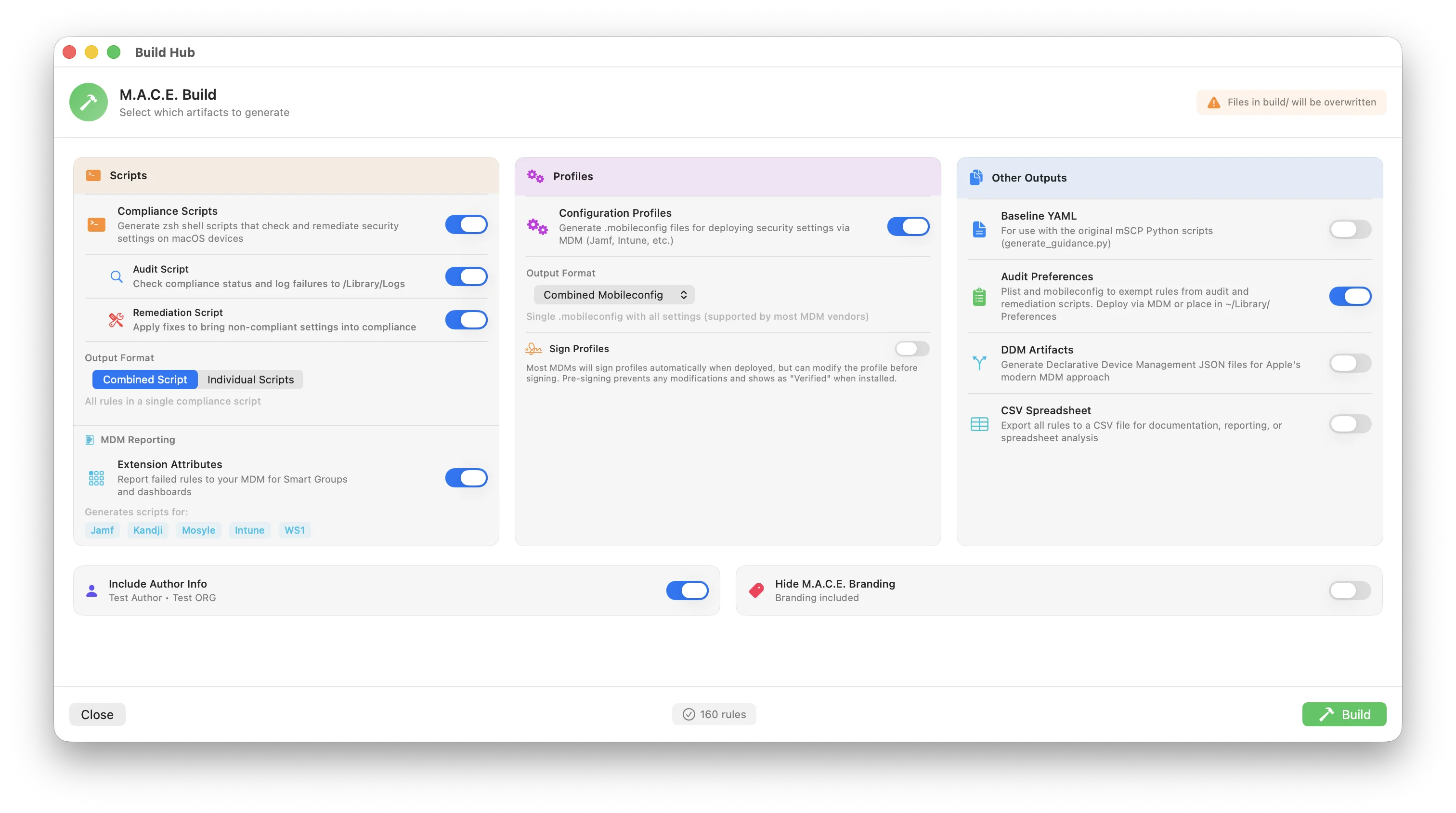
What Does Build Do?
When you click Build, MACE takes all your enabled compliance rules and generates files you can actually deploy to your Macs. Think of it like compiling code: you've configured your rules, now MACE creates the deliverables.
These deliverables fall into several categories:
Scripts
Shell scripts that run on Macs to check compliance status and fix non-compliant settings. Your MDM runs these scripts and reports results back.
Configuration Profiles
XML files that configure Mac settings automatically. Your MDM pushes these to devices and macOS applies the settings. No scripts needed.
DDM Declarations
Apple's modern management format. The device enforces settings autonomously instead of waiting for MDM commands.
Supporting Files
CSV exports, audit plists, and baseline files for documentation, tracking, and compatibility with other tools.
Why You Need All Three
A complete security baseline requires a combination of scripts, configuration profiles, and DDM. No single method can enforce everything.
Why not just use one?
Scripts alone won't work because some settings can only be enforced by macOS through profiles. A script can enable the firewall, but a user could disable it afterward. A profile locks it so they can't.
Profiles alone won't work because Apple doesn't provide profile payloads for every security setting. Many settings (like checking SIP status or audit configurations) have no profile equivalent and must be checked via script.
DDM alone won't work because it's newer (macOS 13+), not all MDMs fully support it, and not all settings have DDM declarations yet.
The solution: MACE generates all three from the same rule set. Each rule knows whether it needs a script, a profile, DDM, or a combination. When you build, MACE creates the right output for each rule automatically.
Understanding the Output Types
Scripts vs Profiles: What's the Difference?
This is one of the most important concepts to understand:
🔍 Scripts Check & Fix
Scripts run commands on the Mac. They can read current settings, compare against expected values, and execute fixes. Scripts are flexible but require the MDM to trigger them.
Example: A script runs defaults read to check if the firewall is enabled, then runs socketfilterfw --setglobalstate on to enable it if not.
⚙️ Profiles Configure
Profiles declare settings that macOS enforces automatically. Once installed, the Mac maintains those settings. Users often can't change them.
Example: A profile declares askForPassword = true for the screensaver. macOS enforces this setting and grays out the checkbox in System Settings.
When to use which?
- Profiles are preferred when available because they're enforced by macOS itself
- Scripts are needed when there's no profile payload for that setting, or when you need to check/report compliance status
- Most deployments use both: profiles to enforce settings, scripts to audit and fix what profiles can't handle
Why Multiple Profile Formats?
Different MDM solutions expect different file formats:
| 📱 | .mobileconfig | Standard Apple format. Works with any MDM and can be installed manually. |
| 🟢 | .plist (Jamf) | Jamf Pro's Custom Settings payload expects this format for preference domains. |
| 🔵 | .xml (Intune) | Microsoft Intune uses a specific XML schema for custom macOS settings. |
Build Pipeline
When you click Build, MACE processes your rules through these phases:
Build Options
The Local Build screen has two columns. Build Output on the right is the core of every build: the baseline name, the profile format, and the switches for configuration profiles, compliance scripts, and audit preferences. The left column holds Additional Outputs, Attribution, and Signing. Compliance rules can be enforced via shell scripts, configuration profiles, or DDM, so you choose the output formats that match your deployment workflow.
Build Output
The baseline name, profile format, and the three main outputs.
The chip in the Build Output header switches between two script modes. Standard builds the compliance script as a plain shell script that you or your MDM run on demand, or on the MDM's own schedule. Advanced builds the Offline Compliance Script instead: the same script packaged as a self-installing LaunchDaemon that runs on a local schedule, even when the Mac is offline or not checking in to MDM. It swaps the Compliance Scripts row for the installer, uninstaller, and suppression profile rows. Profiles, audit preferences, and the other outputs are the same in both modes. macOS only.
One name for everything this project builds. It sets the script's baseline_name, the org.<name>.audit preference domain that audit exemptions are read from, the audit plist and schema file names, and the profile and declaration identifiers, so they always match. Leave it empty to use the compliance ID, such as cis_lvl2. Set it to mark a tailored baseline as your own, for example company_macos. Lowercase letters, digits, and underscores only.
The name is saved with the project and shared with every MDM tab's Upload Settings. Changing it on Macs that already run this baseline moves the exemption domain and log files, so re-export the audit preferences and script together.
One format for every profile this build writes, so the configuration profiles and the audit preferences profile always land on the same MDM in the same shape:
Mobileconfig: standard Apple format. Works with every MDM and can be installed by hand.
Mobileconfig (Jamf Compatible): wraps the payloads in Custom Settings so Jamf Pro keeps every key when you upload.
Plist Format: raw preference files for Jamf Custom Settings.
XML Format (Intune Compatible): raw preference files for Intune.
Plist and XML are always one file per preference domain, so choosing them switches Configuration Profiles to Individual, and neither can be signed.
Standard mobileconfig profiles for device settings. Rules that map to preference payloads, like screen saver or software update settings, are delivered this way and can't be changed by the user.
Off: no profiles.
Combined: all settings in one mobileconfig, using the name you set.
Individual: each preference domain in its own file under build/mobileconfigs, named with your prefix.
A zsh shell script generated from your baseline that runs on each Mac, by hand or through any MDM. It checks every rule and records pass/fail results, logging failures to /Library/Logs.
Off: no script.
Combined: one script containing all rules. Easier to manage and run everything at once.
Individual: a separate script per rule. Not recommended for most setups, since it can mean 100+ files.
Lets the script fix failing rules in fix mode. The audit check always runs first and records what failed; fixes only run against those results. With remediation off, the script only audits and reports and never changes anything on the Mac.
Bakes the chosen run mode into the script by setting FORCED_MODE. Pin a mode when the script is launched by something that can't pass arguments.
None (Empty): read the mode at runtime (command-line argument or Jamf $4).
--check: audit only.
--fix: remediate only.
--cfc: check, fix, then check again.
The --fix and --cfc options are hidden when Remediation is off.
A configuration profile that manages the baseline's audit settings on each Mac, primarily rule exemptions. Rules marked exempt in this profile are skipped by the compliance script and don't count against the Mac's compliance status. It follows the shared Format above. Deploy via MDM or ~/Library/Preferences.
Writes the audit preferences as a JSON Schema manifest for Jamf Pro's Custom Settings UI, so exemptions can be managed from Jamf's editor rather than by hand. This is a manifest, not a profile, so it ignores the Format row and can't be signed. Leave it off to have the audit profile follow the shared Format like everything else.
Advanced: Offline Compliance Script
Switch the Build Output chip to Advanced for a self-scheduling installer. macOS only.
The compliance script packaged as a self-installing LaunchDaemon. The installer drops a LaunchDaemon, a 60-second starter, and your script onto the Mac. The starter checks a timestamp every minute and runs the script when your interval elapses, whether or not the device is online. To update, push the installer once; one check-in covers every future run.
When to use: Devices that aren't always online, environments where you want continuous compliance without waiting for MDM check-ins, or when you want to ship one installer and have it self-maintain.
Standard vs Offline Script
Standard scripts run when your MDM triggers them. Each execution depends on a policy or check-in.
Offline Script installs a LaunchDaemon. The Mac runs the script on your chosen interval whether or not it's online or has checked in.
The local schedule, in minutes or hours. The embedded script is locked to --cfc (check, fix, check) mode. This isn't configurable in Offline Script builds.
Daemon Label is the LaunchDaemon's reverse-DNS identifier, such as com.yourorg.cis_lvl2. Org Folder is the install folder under /Library/Scripts, which defaults to MACE.
Boots the daemon out and removes the script and LaunchDaemon plist from the Mac. Logs in /Library/Logs/ are preserved. Both the installer and uninstaller must run as root. There's no MDM "unassign" that takes the daemon back, so keep the uninstaller handy.
A single mobileconfig with one Managed Background Items payload that pre-approves the daemon by label. Without it, users see a "Background Items Added" notification and can disable the daemon in Login Items. It's always a standalone profile, even when other profiles are Combined, and it can be signed with the Suppression checkbox under Signing.
Additional Outputs
Reporting, DDM, and extra export formats for scanning, automation, and legacy workflows.
Per-vendor artifacts that read each Mac's latest audit results and report its compliance status to your MDM, for Smart Groups and dashboards. One build writes a script for every vendor, so you keep the ones your MDM uses and ignore the rest. They land in build/extension_attributes alongside a README with setup steps:
Jamf Pro extension attribute · Intune custom attribute · Workspace ONE sensor and custom attribute · Iru custom attribute · Addigy custom fact · Fleet osquery policies (.sql)
They read the results the compliance script leaves behind, so that script has to be running on the Mac. The same switch also writes Fleet GitOps files to build/fleet_gitops: this build's profiles, scripts, and declarations in a lib/ tree plus the matching YAML entries to merge into your repo. macOS only.
Writes rules that have a DDM form as .json declarations under build/. DDM is Apple's newer management protocol, where the Mac enforces the declared state itself. Most of these rules also have a profile payload or script fix, so they're enforced either way. A few are DDM only, and the build pane names them. Few MDMs accept declaration files for direct import today, so check that yours does. MACE delivers them itself only through Export to Fleet.
The baseline in mSCP's own format, listing every included rule by section. Use it with the mSCP Python scripts, such as generate_guidance.py, to rebuild this baseline outside MACE.
One row per included rule with its ID, title, section, and references, for spreadsheets, auditor reviews, and tracking systems.
A .audit file for Tenable Nessus that checks Macs against this baseline during a vulnerability scan. Import it into Tenable as a custom audit. macOS only.
A JSON Vendor Manifest in the mSCP community format: every automated rule with its check command, expected result, references, severity, and fix, plus where the compliance script writes its audit plist and log. Security vendors and automation tooling read this to evaluate the baseline without parsing the rule YAML. Inherent, permanent, manual, and n_a rules are left out.
Attribution
Who produced the baseline, and whether MACE says so.
Stamps the project's author name and organization into the generated files, including script headers and profile metadata, so teams can see who produced the baseline. Set them from the Author Info card in the Compliance Editor's left sidebar. With no author configured, the checkbox is disabled and the row reads "No author configured".
Strips the short M.A.C.E. attribution comment from the generated files, so the output carries only your own author info.
Signing
Pre-sign profiles with a certificate from your Keychain.
Most MDMs sign profiles automatically when deployed, but can modify them first. Pre-signing locks each profile and shows it as "Verified" when installed. Pick one signing certificate from your login keychain. Signed copies are written to build/signed next to the unsigned originals. Signing only applies to mobileconfig output; Plist and XML formats are never signed.
Picks which of this build's profiles are signed with the certificate. Config Profiles covers every configuration profile. Audit Prefs covers the audit preferences profile. Suppression appears in Advanced mode and covers the offline package's Managed Background Items profile, so the pre-approval can't be edited before install. Anything left unchecked is written unsigned, and a target is disabled when it has nothing to sign.
Output Directory Structure
After building, you'll find these files organized in your project's build/ folder:
build/
├── {baseline}_compliance_script.sh         # Combined compliance script
├── {baseline}_configuration_profiles.mobileconfig   # Combined configuration profile
├── {baseline}_audit.mobileconfig           # Audit preferences (exemptions); .plist, .xml, or
│                                           #   _jamf_schema.json depending on Format
├── {baseline}_csv_spreadsheet.csv          # Spreadsheet export (if enabled)
├── {baseline}_baseline_yaml.yaml           # mSCP-compatible baseline (if enabled)
├── {baseline}_tenable.audit                # Tenable Nessus audit (if enabled)
├── {baseline}_manifest.json                # Vendor manifest (if enabled)
├── README.md / README.txt                  # Deployment instructions and exemption list
├── scripts/                                # "MACE - <rule>.sh", one per rule (Individual)
├── mobileconfigs/                          # "MACE - <payload>.mobileconfig" (Individual)
├── plists/                                 # "MACE - <domain>.plist" + manifest.plist (Plist format)
├── intune/                                 # "MACE_<domain>.xml" (XML format)
├── signed/                                 # Signed copies next to the originals (if enabled)
├── extension_attributes/                   # MDM compliance reporting scripts + README
├── fleet_gitops/                           # Fleet GitOps lib/ tree and YAML (if enabled)
├── advanced_scripts/                       # Offline installer, uninstaller, suppression profile (Advanced)
└── {baseline}_declarative/                 # DDM declarations (if enabled)
    ├── activations/
    ├── assets/
    └── configurations/
The MACE prefix on individual files comes from the Name or Prefix field on each row, so every name above can be changed. Only one audit preferences file is written, in whichever shape the Format row selects.
Build Engines

mSCP Build Engine
Integration with the original mSCP Python scripts for organizations that need compatibility with existing workflows.
- Standard mSCP output formats
- Python-based execution
- Full mSCP compatibility

M.A.C.E. Build Engine
MACE's native Swift build engine. Fast, fully featured, and supports all customizations.
- Full ODV substitution
- All output formats
- Profile signing
- Custom rule support
- Direct MDM export
Starting a Build
:::tip Before you click Generate
Generating replaces same-named files in the project's build/ folder, which is what the Overwrites files in build/ chip in the footer is warning about. Files from earlier runs that this build doesn't write are left in place. The Output Drift pill in the title bar turns orange whenever rules change after a build, and goes back to Output Synced once you generate again. See Settings to hide it or swap the label for per-output icons.
:::
MDM Export
In addition to generating files locally, the Build Hub can upload your compliance artifacts directly to your MDM. Select the MDM tab in the Build window to configure a connection and export.
Connect to your Jamf Pro server with API Client credentials or username/password. MACE generates scripts, profiles, and the extension attribute, then uploads them to Jamf's Scripts, Configuration Profiles, and Extension Attributes objects automatically. Profiles can be combined or split per payload type, scripts per rule. It can also create Smart Groups (Compliant and Non-Compliant), an Audit Policy on a schedule, pick a Category and Site, and upload the Audit Preferences or JSON schema. Password policy and FileVault go up as native payloads.
In Advanced mode MACE uploads the offline installer, uninstaller, and suppression profile, and the audit policy runs once per computer.
Connect to your Workspace ONE UEM tenant with the API URL, REST API key, and token region. MACE generates compliance scripts, profiles, and reporting as either Sensors or Custom Attributes, then uploads them. Choose your Organization Group, deliver scripts as Scripts or a Product, and select which artifacts to upload.
Connect with the Directory (tenant) ID, Application (client) ID, and client secret from the Entra admin center. MACE generates compliance scripts with a Script Frequency, Settings Catalog profiles, custom attributes, and an optional Compliance Policy that marks Macs noncompliant when rules fail, with assignment filters. Configure naming and select which artifacts to push.
Connect with your Iru API URL and token. MACE uploads compliance scripts into audit and remediation slots, profiles, and a Failed Rules Report custom attribute, and can assign everything to a new or existing Blueprint or leave it in the Library.
Connect with an Addigy API key, pick an Organization, and MACE pushes compliance profiles, scripts, and a Compliance Fact, optionally assigned to a Policy.
Connect with an API token or email and password. MACE deploys profiles, audit preferences, scripts, DDM declarations, labels, and a combined or per-rule Compliance Policy with a Failed Rules report. Hold for Scoping targets an empty staging label so nothing reaches hosts until you scope it, and a custom profile prefix or name lets you stage rollouts side by side. A GitOps kit is written with every export.
Local Build vs MDM Export
Local Build generates files to a folder on your Mac. You then upload them to your MDM manually.
MDM Export generates the same files and uploads them directly to your MDM in one step. Every MDM follows the same Settings → Review → Upload → Verify flow: saved servers live in the Keychain, Test checks the connection and permissions, the Review screen shows exactly what will be sent and nothing goes up until you confirm, and after the upload MACE verifies each object on the server. An activity history is kept per project, and an archive of every upload lands in a folder such as jamf_uploads/ next to build/. Each MDM has its own options and connection settings, while the Baseline Name is shared with Local Build.
What's Next?
After building, you need to deploy the generated files to your Macs. See these guides for detailed instructions:
- Scripts: How audit and remediation scripts work, and how to deploy them via MDM
- Configuration Profiles: How profiles enforce settings, and how to deploy them via MDM
- DDM Declarations: How Apple's declarative management works